

How to Generate a Certificate Signing Request - CSR in cPanel
Overview: How to Generate a Certificate Signing Request - CSR in cPanel
This guide explains How to Generate a Certificate Signing Request - CSR in cPanel step‑by‑step and why it matters for security, uptime, and performance. It’s written for small and medium businesses that rely on Blackhawk MSP for proactive, managed IT support in the Bay Area and beyond.
- ✅ Clear, actionable steps
- ✅ Best‑practice notes from our MSP engineers
- ✅ Links to related services and help
Tip: If you’re short on time, contact us — we’ll handle this for you and verify everything is working.
Obtaining a certificate from a trusted SSL provider requires a Certificate Signing Request (CSR). CSR is also needed for generating self-signed SSL certificates. Follow this tutorial to generate a CSR.
1. Log in to your cPanel account.
2. In the Security section, click on SSL/TLS.

3. Under Certificate Signing Request, click on Generate, View or Delete CSR Link.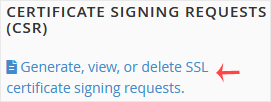
4. Scroll down and enter the following details:
- Domains: Enter your domain name, such as www.example.com (domains with www cover both non-www and www domains)
- City: Your city name.
- State: Your state name.
- Country: Choose your country name from the drop-down menu.
- Company: Your Company name.
- Company Division: Name of your company division.
- Email: Enter your email address.
- Passphrase: Enter a passphrase (maximum 20 characters) and do not use special characters.
- Description: You can leave it blank.
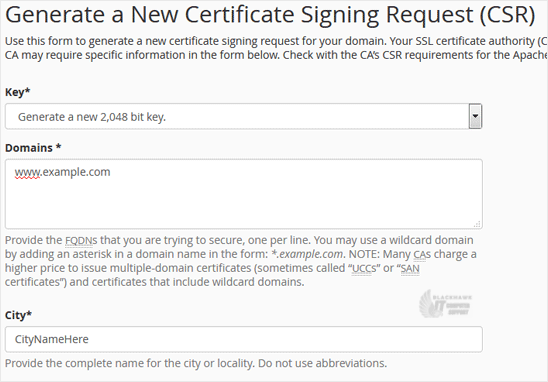
5. Finally, click on Generate. Copy the generated CSR code and save it to your computer. You can use your CSR while purchasing an SSL or reissuing an SSL in the future.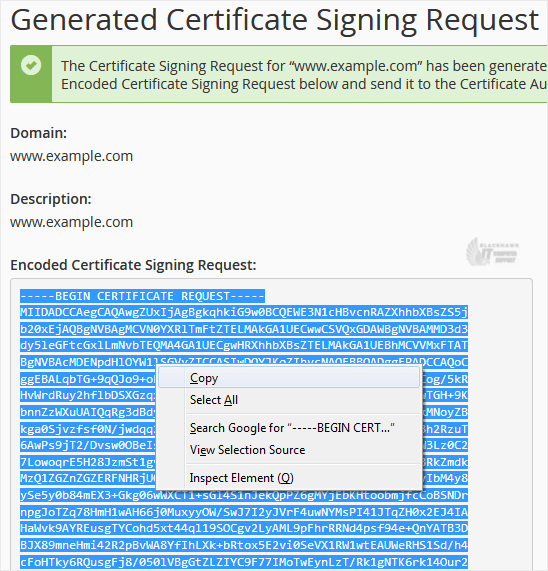
You have generated a Certificate Signing Request in cPanel, and you can now use it to get an SSL certificate for your domain.
Video tutorial temporarily unavailable while we refresh links. If you need more help, please call us at 1-925-218-4000.
Need help? Blackhawk MSP can do this for you, verify success, and document the change. Call 1‑925‑218‑4000 or open a ticket.