

How to Install SolusVM 1 Slave Node on Linux
Overview: How to Install SolusVM 1 Slave Node on Linux
This guide explains How to Install SolusVM 1 Slave Node on Linux step‑by‑step and why it matters for security, uptime, and performance. It’s written for small and medium businesses that rely on Blackhawk MSP for proactive, managed IT support in the Bay Area and beyond.
- ✅ Clear, actionable steps
- ✅ Best‑practice notes from our MSP engineers
- ✅ Links to related services and help
Tip: If you’re short on time, contact us — we’ll handle this for you and verify everything is working.
SolusVM is a popular VPS hosting control panel. SolusVM 1 Slave should be installed on a dedicated server..
What are the requirements?
- Fresh AlmaLinux 8, CentOS Stream 8, or CentOS 7 installed on your VPS/Server.
How to install SolusVM 1 Slave?
Step 1: Log in to SSH as a root account.
For AlmaLinux 8 or CentOS Stream 8, run the following command:
curl -o installer https://files.soluslabs.com/solusvmphp7/install/installer && chmod +x installer && ./installer
For CentOS 7, execute the following command instead:
curl -o install.sh https://files.solusvm.com/install.sh && sh install.sh
Step 2: For CentOS 7, it will show you an option to choose virtualization. Most people prefer KVM or Xen. Select your preferred virtualization by typing the option number and pressing Enter.
Note: Select the KVM virtualization node option on CentOS Stream 8 or AlmaLinux 8.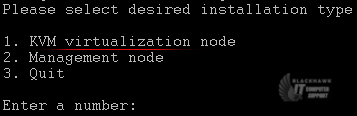
Installation can take from 5 to 10 minutes.
Step 3: Once it completes, it will show you the Slave keys and further instructions for your virtualization type. You can now use these keys to add a node to your SolusVM Master panel. You will need to have a SolusVM 1 Slave license for each node.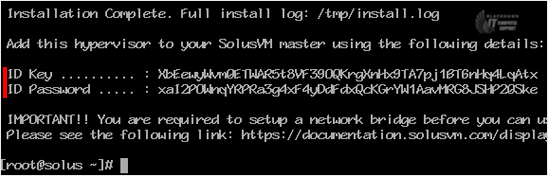
Video tutorial temporarily unavailable while we refresh links. If you need more help, please call us at 1-925-218-4000.
Need help? Blackhawk MSP can do this for you, verify success, and document the change. Call 1‑925‑218‑4000 or open a ticket.